12 January 2012

Code validation advocacy

It was said many times that static code validation sucks, validation warnings are false and senseless.

Well, it is a common mood despite numerous words to support code validation. So just my 2 cents.

What code validation tools do

So what is the code validation about - starting from most simple topics. Some are not covered - such as API analysis.

  1. Copy-paste

    Detects chunks of duplicated code. It is bad, obviously.

  2. Formatting

    Checks if the source code follow certain formatting rules.
    Well, these rules may differ from Sun, Microsoft or Google ones. That doesn't matter. The only things that matters is that the rules must be the same. For the whole project. For all projects around. Soon you will get used to them. And the project code will be like a book printed with a good font but not a hand-written notes on a napkin.
    And we don't write in Brainfuck, right?

  3. Bad words

    Checks for certain typical words in comments - such as TODO, FIXME, DEBUG, etc.
    Imagine - you are a Big Company and your contractor sent you a piece of code. In the middle of the code:

    /* TODO: implement it according to the spec */

    What will you say? "WTF, what did they send?!"
    Put TODOs to your code in development. But clean them out prior to submission to a repository. Not just delete the comment but solve its cause. Leave the code in a stable state. If there is a problem - create a task in an issue tracker.
    Finally we are coders. Our product - those text files that we submit to the repository. Those lines of text brings us our money. They must shine.

  4. Documentation

    Checks that all relevant code items have inline documentation.
    Sure good inline documentation is the must. Lack of proper inline docs leads to misuse, time waste and re-invention the wheel. And don't bother to choose what should be documented and what should not. You are not a prophet and cannot predict how and when this code will be used. So just document everything.
    Checks for legal stuff - such as license headers. Remember - nowadays is the era of lawyers. So don't feed the trolls.

  5. Anti-patterns

    Looks for coding patterns that are either bad practice or directly dangerous.
    Most developers can argue that in this specific case it won't cause problems. Nobody can predict all execution flows. Nobody can imagine all possible uses in the future. All these anti-patterns may cause problems. So take for granted that if they can cause problems they will - according to the Murphy law.

How do code validation tools affect developers work?

  • Difficulties?

    Everyone has habits. Everyone has own taste for formatting. OK, IDE will do it for you.
    Everyone has own code tricks. That is good sometimes - for sole coding. For team work it is not acceptable. We are speaking the code to our colleagues and need to understand and to be understood.
    It takes precious time. But bugs takes more. Bugs by you, by users of your code. Maintenance takes even more.

  • Profit!

    It really helps to avoid some bugs.
    It makes more transparent and easier to understand for teammates - so developers can switch faster and accustom better with a new code. They will use the existing functionality better and make less bugs.
    It makes code look more clear and professional. That means - more valuable. That means higher customer satisfaction.
    The more professional is code look, the less tension it will cause with the customer-side reviewers - they are seldom benevolent.

What should we do?

Just follow the code validation rules. Always. But switch brain on and do not invent constructions to just shut the validation rule up.

It is not difficult, is it?
08 April 2010

Oracle says

An Oracle official states Oracle position regarding development tools:

  • NetBeans will continue with strong Java focus and more resources. Other languages will be transferred to (supported) community.
    Though the primary Java development tool (for RIA) is JDeveloper.
  • NetBeans will remain free.
  • Eclipse will be supported too.
  • Hudson continuous integration server will be moved forward with power:
    "... Increase the investment in Hudson, lots of synergy with Team Productivity Center. ..."

It's an important clarification after the Sun acquisition.

Another point is the Hudson value. It is recognized as a similar importance tool as major IDEs. And Oracle has ambiguous plans regarding to Hudson.

18 June 2009

Would you lease a software?

Not you as a private person. Your company or, better, your own company.

Typical interaction between a software provider and a consumer often belongs to one of the following ways:

  1. Provider sells you a Box, you pay big bucks. Provider is happy.

  2. Provider sells you a set of Boxes ("licences") and a expensive service contract, you pay very big bucks first and some bucks later. Provider is happy for a time.

  3. Provider crafts a Software suited to your needs (at least promulgates it) and ties you with the maintenance service. You pay huge bucks now and big bucks for a while.

But a business never needs a software. Because it is not an asset. It is just a tool. And a specific tool can be utilized only by a specific professional. For example a wholesale FMCG company needs some furniture for its office. Does it need a saw and a hammer? No! It doesn't need even a carpenter who uses these tools to make tables and cabinets. It needs furniture.

In the cases "1" and "2" above a software provider sells me "saws" and "hammers". The last case gives me the desired service but for enormous price - it is rarely justified. And in every case I pay first and take all risks of later tool (software) use, efficiency and ROI. Why?! Because the current software market is a seller's market.

Aside from software - what tools do I buy for my company? That are proved to be used for a reasonable time by my staff for my primary business activities. For the rest I lease them or even order a professional service. For example: I am a wholesale company. Do I need a shiny box titled "SuperDuperCRM version 1.2.3 configuration XYZ" for my business? No, I need an up-to-date CRM system tailored to my current requirements (no more). While I interact with a large customer base (no longer). I.e. I need a service. And I ready to pay for the service at the rate I consume it. Obvious?

For every other subject it is obvious. We know - it's better to pay later. But for software we waste our money for shiny cartons. A hurtful habit.

So the question is neither technical nor financial. It is rather psychological. And the answer relies on habits. And (if the answer is "no") its change will boost software service market. All the current SaaS (software as a service) media buzz is because of it.

23 May 2009

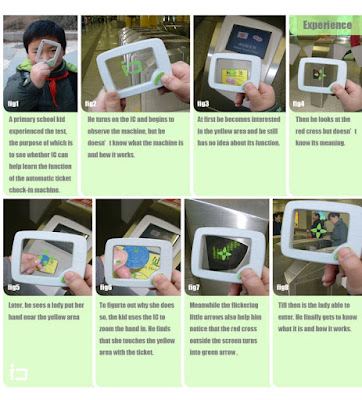
Tao Ma's IC inspired

Tao Ma's IC

The gadget is just a learning tool. But a similar device could be a glass to read between lines. You direct the device to a thing, the device requests the thing, it replies. And a "how-to" icon about the thing is displayed.

21 May 2009

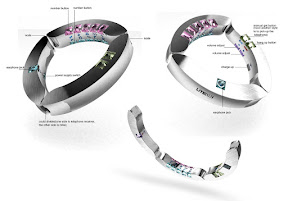
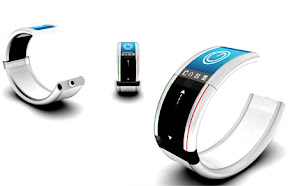
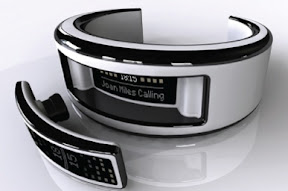
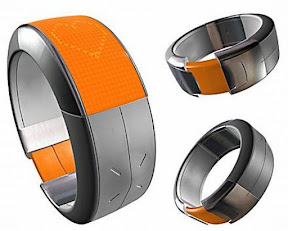
Bracelet cell phone calls you gently

Bracelet cellphone - an inexhaustible theme for designer exercises. Just a short glimpse over the Web:

All these devices capture your attention to an incoming call in the same way - they vibrate. It is so easy to miss such a vibration in a day buzz. Even if the phone is in your pocket. And this noisy behavior of the elegant jewel is rude and irritating. The bracelet braces a wrist, what should it do on an incoming call?

It should squeeze your hand gently.

04 May 2009

Problem - type while walking

To use a notebook computer you have to seat down. Then you can type. The same difficulty is for sliding qwerty compacts such as OQO.

But often you are standing or even walking. And wanting to write a note, to schedule an appointment or to record a contact. And there are no time or appropriate place around to seat, to unpack a laptop and to open it. The only working solution is a touch screen PDA and a stylus. Left hand hold the device, right hand write with the stylus. But again, scribing is slow and screen keyboard is terrible to use. Well, there are things like the kangaroo laptop holder, but this is usable in rare situations only.

Any ideas?

01 May 2009

One-button mobile phone for children

Mobile communications for children. A worry point for parents - babies are to be in touch. A sweet piece for mobile operators and phone manufacturers - children are not fully captured by the business and can consume more traffic. So - the classic design exercise: mobile phone for children. It must be:

  1. Suitable for users (very young people): simple, pretty, light, tough and safe;
  2. Suitable for owners (very nervous parents): controlled, reliable and cheap.

The common root for all these properties is: being simple.

So - the small rounded rectangle with a single button: "Call". The idea of such a minimalistic one- or two-button communication Device is not new. Moreover it is actively exploited, especially as an emergency device - you press the button and the phone will connect you to the call-center. The proposed idea core is to adapt the Device class to the specific use.

  • Shape and size. There are two size limitations: length (for the antenna to work) and volume (for the battery to store energy). Device length can be 8 cm (wavelength quarter) or even smaller for 900 MHz GSM - quite compact. Battery feeds just a transmitter - there are no bright displays or powerful CPUs, so its capacity (and volume) could be small. I suppose a small rounded brick would be the best shape - it can be pleasant, easy to personalize (important for youngs) and simple to manufacture. The Device housing should be cast solid - no holes, sockets or detachable parts. Thus enough durability, water-, dust- and dirt-proofness will be achieved. So even the battery can have no packaging therefore saving weight and manufacturing cost. To avoid SIM-card manipulations the SIM chip have to be integrated into the Device. The speaker and the microphone should use a surface membrane, thus eliminating garbage collecting holes.

  • Controls. A button "Call the parent" - call a programmed number. The same button is used to hang up. Slightly advanced model can have several call buttons - for a specific number each. If the programmed number calls, the appropriate button will blink. For a rectangle case the best button shape is rectangle too. Ordered in a single column along the main axis of the Device face.

  • Power supply (charger). No sockets. A short-length wireless inductive power transmission should be used (a split electric transformer). Field shape design, relatively low frequency and device sensor make this approach safe enough. Also this EM link acts as a communication medium (see below). It should be a "base station" to drop the Device for charging.

  • Communication. Again - no sockets. The primary medium to control and program the Device is a contact-less base station. It is wired to the mains for power, optionally - to a computer. And - to a parent mobile phone via Bluetooth to program and control.

  • Programming. To assign a phone number to a button and to free a button. To accept or reject unidentified calls. The simplest way ("call me") is:
    A parent dials the device number -
    - The Device detects the calling number and rings, all free buttons blink -
    - Press a blinking button; the calling number will be assigned to the button.

    More complex approach is an (Java) application for a parent mobile phone. The application connects the Device base station via Bluetooth and later - the Device itself via an proprietary power link protocol (see Power supply). The application uses an unique security code (such as SIM PIN code) to access the Device.

    In the last case the Device is programmed by the mobile network operator remotely. A parent uses the operator web interface to request a programming task and the operator does the job via SMS or so.

  • Personalization. The Device has a simple and solid shape with flat sides. This makes it suitable to be decorated. The membrane "call" buttons could be signed by a pen and a thick soft transparent rectangle (provided with the Device) could be glued over to make a customized button.

  • Service. The device have to be locked to a mobile network operator. Sure the operator will offer dedicated group tariffs for parents and children with the Devices. The Device can guess its location using network cell data (to avoid an extra GPS receiver). And the Device should track is it with the child or not (using location tags or a simple electric capacitance measurement). Parents are informed about this by SMS or by an operator location service and a Java application for a parent's phone.

Safety. The device is deeply personalized. A stealth biometric authentication (such as one being developed by Apple) pushes the personalization even more. Also the Device is so cheap that there are no reason to steal it or even to robber. So it is safer for children. Simplicity and tough construction make the Device not breakable. So accidental injury risk is less.

Network operator side. Because there isn't a SIM-card, the Devices are sold with a pre-programmed phone number. Because of the users nature, the Devices will be lost frequently. Thus many phone numbers are wasted. But these numbers can be reused fast - only the parents know the actual Device phone number so no one will call the lost Device.

The Device should observe some of common earlier proposed location tags: classroom, gym, theater, etc. So there won't be loud rings in a class.

The Device could be good and simple for parents. I.e. for money payers. I.e. could be sold in tons even in drug-stores.