14 April 2019

If the cloud is the computer, who are the cloud developers?

Nobody wants to be in Operations. It doesn't give you all those technology toys so abundant these days. It also means a quite pronounced compensation gap to those having "developer" in their title. These tensions are the origin of a popular HR cliche - "DevOps engineer". But its popularity doesn't come just from the dissatisfaction of operations engineers. And, while it solves the HR pain, it doesn't do the same for the business problem.

The millennium brought a significant change in computing infrastructure for commercial applications. It used to be hand-made, sometimes even by means of physical tools. Now it is API-controlled. Like Ritchie called malloc() in 1970x to get some room for the application data, we call a (cloud) API to get memory and computational power, to interconnect parts of the application system. The cloud is not a bunch of virtual machines, it is a medium running application software systems. The cloud may be a public IaaS like AWS, or on-prem middleware like Kubernetes, or a serverless platform, but that are details. The cloud is the computer for application software. It is a big deal and it does affect professionals working with it.

Computing infrastructure becomes less separated from application code. Evolving from custom-built bare metal servers to application middleware to immutable VMs to serverless and cloud native architectures. The staff working with computing infrastructure is expected to have skills like regular software engineers have. Because software took over that used to be controlled by human management processes.

Deployment of an application system to a computing infrastructure used to be an operation activity. Requiring skills in operations and operational processes. Now deployment topology of an application system is a part of the application design, its implementation is a part of the application code, it is delivered like any other software. Deployment engineers have to have the traits of software developers. They need to know not just how to code, but also how to plan, deliver and ensure quality.

Meanwhile operations of software systems become routine. Much less craft or magic. Humanless or push-button operation became an implicit requirement from business stakeholders willing reduce risks and cost of ownership. Application operations dissolve in the product teams. Eventually operations cease to be a separate activity worth a dedicated department. At the other side, shorter release cycles, Continuous Delivery, DevOps transformation made operations an invaluable source of feedback for application developers, a major pillar for QA process. Former technicians are effectively doing now that is known as "exploratory testing". Toil elimination trend calls for automation. Scale and velocity of application systems make eyeballs inadequate for system behavior analysis. It brings software code doing operation, monitoring, remediation. Done right it becomes a discipline referred to as SRE.

Application development also has to adapt to this "cloud computer". Applications has to be coded for the cloud computing architecture and APIs. One cannot just throw a Linux ELF or a Java JAR binary at a cloud infrastructure. The cloud computer is efficient - if it is used efficiently. Lastly the cloud computer is enormous but not reliable, just due to its scale.

All that stretches responsibility of the existing professional groups (primarily Development and Operations) way beyond a comfortable level. Operations suffer more because the same people works within different (often mutually exclusive) processes.
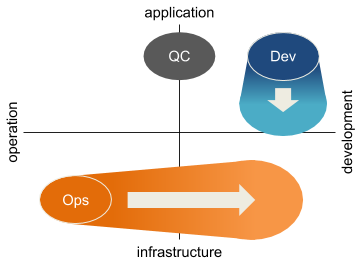
The old school professional profiles do not work well in the new landscape. They need a transformation. HR rebranding "Operations" to "DevOps" does not help much. Business and engineering problems need more, they need professionals skilled and trained for the new problem domain and processes matching these domains - application development and delivery with cloud computing. These professional roles may be

  • Application developer. Expert in business logic and UX domains. They will learn holistic system view from Operations.
  • Quality assurance engineer. Coming from testers (quality control) group, they need analysts skills and full stack familiarity with the application system.
  • Reliability engineer (SRE). Expert in automation, operations and feedback. Adopt a lot from QA.
  • Cloud developer (let's call them that way). Experts in infrastructure and system operation domains. They are to acquire decades of software delivery body of knowledge.

Advent of cloud computing has forced the change, but it also simplifies it. The "cloud computer" takes a lot of operation and infrastructure development burden. It lets professionals working for the application domain to focus on specific problems.

"Cloud developer" is a new title, but it has roots in the past. It is a system software engineer moved to the era of cloud computing. Same traits - strong knowledge of the underlying infrastructure and familiarity with system operations. Same challenges - long product lifetime, difficulty of changes and high expectations for quality. Though "cloud developer" is not the same as "system software engineer". A system software engineer implements a tiny interface to the underlying hardware in a way that is as application agnostic as possible. While a cloud developer makes a skeleton of an application system. As a skeleton it is not functional by itself but has the shape and major properties of the resulting living product or service. More than any other part of the application body it demands holistic understanding of the habitat, the scale and the behavior.

Obviously a cloud developer is a member of a development team. A team is a group of professionals working towards a common goal following shared processes. What is distinct for development teams:

  • The work is planned. With all the agility, a development work has to be planned or it won't reach its goal.
  • The work creates transferable artifacts. A product of the work is useful by itself, separated from its creators.
  • Work artifacts have quality guarantees built in, provable and enforceable.

Quality is paramount for an application system skeleton because it is difficult to fix or change later. A skeleton needs to absorb without crushing the harm and wear by unplanned changes, shortcuts and defects over the system lifetime. While the quality almost newer improves over time. Luckily, software development industry created plenty of quality assurance tools - design methodologies, feedback cycles, high level languages, cross-validation, various forms of evaluation and testing to name a few.

But why an organization should invest in the change, grow this new professional group? Cloud technologies mature. Business takes them (mainly their promises of efficiency and velocity) for granted. DIY craft by "Jack of all trades but master of none" people rebranded from Operations ceases to match these expectations. Application development for the cloud is a big slice and it is not uniform. It requires complementary skill sets too broad to fit comfortably to a human head. It justifies another professional branch. And provide new opportunities for those sitting in development and operations silos, regardless if they are labeled with "DevOps" in the title or not.

15 May 2016

Our team doesn't use Scrum

We're a small team of experienced engineers developing an infrastructure system for an external customer. We deliberately rejected Scrum as the project management framework and didn't regret. Why?
Infrastructure projects don't bring a direct value (unless it's the primary business). The value has a form of cost saving and comes later when this new facility gets substantial use. Due to delayed utility stakeholders usually don't want to allocate much time and manpower - it means the timeline is under pressure. At the other side infrastructure is a foundational thing, so sacrificing the quality is not an option. So beyond limiting the initial feature set to an essential minimum, the project should be run in a way that
  • is lean (has as low overhead as possible);
  • lets to meet deadlines safely;
  • does not affect product quality or incurs unmanageable technical debt.
Scrum framework mandates fixed-length (1-4 weeks) iterations (Sprints), each iteration having its distinct goal. Technically it means a fixed time-boxed backlog of "User Stories" for an iteration and the goal is to complete the backlog within the iteration. The first issue is that complexity of Stories doesn't care about the iteration length (or capacity - the team ability to do a certain amount of work within an iteration). E.g. we may have an iteration capacity of 10 "units" (story points, man-days or whatever the team uses for estimation) and few Stories of 4 units each. If we pick 2 we plan to waste 2 "units" in the iteration. If we pick 3 - we're planning to fail meeting the iteration goal. It's alignment overhead.
For an infrastructure project Stories take much labour, average time to complete is comparable to an iteration length. Given the alignment overhead is about <time_to_complete_a_Story>/2 * team_size, it's prohibitively high.
Estimation of development tasks isn't exact. Even for a long-running project and an experienced team it comes with an uncertainty. I.e. if a task is estimated for 5 days, there is 50% chance that it will take longer than 5 days (or will be expedited trading quality for time) and in 50% cases it will be completed earlier. In the first case the team fails the Sprint. To avoid that it may add a safety margin to estimations that won't be used in most cases. In the later case (early completion) we get some time but there are no tasks planned for it. This blog post discusses the issue in more details. It's estimation uncertainty overhead.
We know from statistics that the relative error is O(1/sqrt(N_of_tasks)). It comes down with smaller tasks, but for an infrastructure project tasks are long, so the error is high leading to higher safety margin. Roughly we have to waste <estimation_error> + <margin> per each team member.
Standard Sprint has a planning session at the beginning, demo and retrospective - at the end. Practically it means 2 days are lost for productive work. It's planning overhead.
Each Sprint is to deliver customer visible value. Practically it means Sprints are packed with User Stories, bug fixes come then unless they're really breaking. As shown before, at high chance the team has to expedite tasks by cutting corners here and there. Together these trends sink both visible product quality and its sustainability in a long term (that is especially important for infrastructure). Because each Sprint is like the other, nothing stops this degradation. Some teams introduce recurring "stabilisation sprints" to address it. But in our case the customer has to invest long time ahead, so it's difficult to convince him that we need extra time to fix our own kludges. It's bit rot.
OK, an alternative?
That preserves Scrum undoubtful advantages of
  • keeping the development aligned with the the goal;
  • observing and controlling progress to match the project timeline;
  • sustained delivery of user-visible value?
There is no silver bullet. For our case (that's pretty common these days) we use a set of techniques. We call it "Scrumban".
To eliminate operational overhead we got a practice primarily focusing on it - Kanban. It gets rid of alignment and estimation uncertainty costs. It lightens "deadline driven development" syndrome. By explicit limit of work in progress it supports sustained value delivery and keeps team focused. As a side effect it lowers planning burden - it's important because a human brain is quite bad at that activity. Having Kanban boards in most project tracking tools is very helpful - color paper stickers on a whiteboard aren't that fun in reality.
But Kanban doesn't help to keep the development on a right track. Here daily standups and weekly reviews help. Daily standup runs as we used to from Scrum - it starts a day, it's short, it answers 3 questions and it's the main control knob to keep the things rolling in a right direction on a daily basis. Weekly review resembles Retrospective and Planning from Scrum at once, but it's much lighter. At this event the team
  • selects tasks to do next;
  • agrees on implementation plan;
  • refines estimates and adjusts scope.
Plus there is a retrospective review but with no red tape at all. Only things that affect the team progress and are controlled by the team are to be touched. All that together safely fits to one hour - the last working hour on Friday. It closes the organizational overhead for a week.
Also Kanban does a little to follow project timeline. Here we use burndown chart. For the chart to work we need a time span (the whole project, from 1 to 4 months) and a backlog of User Stories. The Stories should be estimated in any units that reflect their complexity. We adopted traditional agile method of comparable tasks.
Then the team need to keep the customer happy and itself - in shape. Sprint Demo does that in Scrum. We use control points, "milestones" set 4-6 weeks apart. Each milestone means a consistent set of features are shown to the customer. But they don't assume there is nothing in progress at that time, so a milestone doesn't incur alignment cost like Sprint does.
Finally - planning. For a customer-requested development we have to deal with fixed price projects. It means fixed time. So we have to estimate it upfront anyway and arrange length and scope with the customer. Practically we get a set of estimated User Stories for a big "iteration" - the project. To make it manageable we should keep these projects within 1 and 3 months (unless it consists of many similar things). As shown earlier, relative estimation error for a longer iteration is less - until it starts to rise when our planning shifts from extrapolation to pure fantasy.
However these techniques don't magically boost the team efficiency. Kanban by itself is not easy. It may be represented as an iterative process where iteration is one day long. It requires much higher level of self-discipline from everybody in the team. Together the workflow is much less regulated. But it means it's denser. And there are no more hours of sitting in a meeting room tossing planning poker cards or watching Jira boards on a wall screen.
I apply this approach for last 5 years refining it over time. It works and is effective given certain prerequisites are met:
  • The team is small, seasoned and co-located.
  • Everybody practice a solid communication discipline - keep teammates informed without disrupting them.
  • The work is expressed in User Stories in its classical sense, not "do that, that and that" style.
  • A long term development is formed from fixed-scope limited-length (1-3 months) compact projects.

19 January 2014

Jenkins performance hints

Well, Jenkins CI server scalability has limitations. But for vast majority of applications its performance is fairy enough. There are installations with hundreds of slaves running about 10k builds daily. While Jenkins configuration is relatively simple, some art required to setup and maintain a busy server. There are some suggestions how to keep it fast - divided to Master configuration, Slave configuration and Job design. Plus few notes on Multi-master Jenkins.

Jenkins Master configuration

Number of plugins. Plugins cause performance issues for builds (because of hooks) and UI (because they adds stuff to it). Do not add too many plugins and anyway - evaluate them thoroughly [ref].

Number of jobs. Jenkins gets slow (at least in UI) with 1000+ jobs [ref]. Moving jobs to several masters (manual static sharding) helps. E.g. one master - for builds, another - for tests. Functional segregation lets to simplify Jenkins configuration and to decrease number of plugins. While splitting a big master to two similar ones leaves two complex configurations on each master.
Keep the number of active jobs reasonable, remove unused.
Utilize Git and Gerrit Trigger plugins to serve multiple branches by one set of jobs.

Jobs on Master. Should be none. Only light internal tasks crucial for Jenkins housekeeping. Definitely - no application jobs.

SCM polling on Master. SCM polling for Git or Perforce require execution of the CLI program for each check for each job. For reliable polling it should be configured to run on master. Polling on slaves (default for both VCS) is bad because slaves are trashable.
Use push hooks instead of polling. For Git use Gerrit trigger - “Ref update” event can replace SCM polling in most cases. For Perforce … set polling period to something large, use “H” or “@hourly” for Cron expression in polling configuration.
Subversion uses SVNkit instead of CLI so it is not affected.

Builds lazy-loading. When JVM minimum and maximum heap sizes differ, WeakReferences (lazy loading uses them) garbage-collected before JVM tries to expand the heap [ref]. It causes extra load on builds re-loading and sometimes may lead to disappearing build records.
JVM configuration for servers should have minimum and maximum heap sizes set to the same value.

Access control. Authenticated users should be allowed to do anything excluding system administration [ref]. “Trust users not to be malicious. Don’t trust users not to do daft things - or read documentation, or to have well behaved unit tests.” [ref] Trust encourages. But also it helps to save on authorization. Complex authorization (e.g. Role Strategy plugin) kills UI performance, API performance suffers too.

Disk IO performance. Use fast disks for configuration (startup time) and build records (build lazy loading) [ref]. SSD on master helps a lot [ref]. Separate configuration, builds records and artifact storage. Worth to look at Pluggable artifact transfer and storage (JENKINS-17236).

Use external API/UI frontend for Jenkins. Jenkins is not very good at UI performance. UI plugins worsen it even more. Workarounds - external UI dashboards or frontend systems [ref]. Examples of problematic plugins:

  • Dashboard view plugin is having a real problem with lazy-loading (it thought being fixed though) [ref].
  • Nested Views plugin causes permission re-evaluation for each job on the server several times. Using regexp to filter jobs makes it worse. Worth to try - use explicit lists of jobs, not regexps. Replace it with Cloudbees Folders Plugin - it might help but needs evaluation.

HTTP cache. Fast HTTP proxy in front of Jenkins to cache static data [ref] might help. But it requires further evaluation.

Servlet container. Embedded Winstone (before 1.535) or Jetty8 (1.535+, but not in 1.532.1 LTS) vs Tomcat. Jetty used to be better on consistent throughput and resource consumption than Tomcat. But for recent Jetty 8-9 and Tomcat 7 there are no clear evidence of it.

Jenkins Slave configuration

Number of slaves. There is “X1K initiative” - goal for Jenkins developers to assure smooth operation of master with 1000 executors on all slaves [ref]. It is still a challenge. Somewhere around 250 slaves and lots of builds slave connections start getting broken in the middle of a build [ref], there are evidences of Jenkins tending to lose connection to slaves when there are about hundred of slaves [ref]. Since thread usage improvement in Jenkins remoting in Jenkins core 1.521 and SSH Slaves plugin 0.27 it should not be an issue [ref, ref], but it is not proven yet.

Number of executors per slave. Increasing number of executors over the slave capabilities decreases overall throughput - due to clashes, IO congestion or RAM swapping. Leverage RAM, CPU cores and build type. RAM should be enough for maximum number of builds at maximum memory setting + file cache. CPU should be enough to work below 100% utilization, taking IO into account - IO releases some CPU time. Have less than 1 executor per CPU core for single-thread builds. Consider IOPS limit - to avoid disk IO being a bottleneck. Generally if 15 min Load Average more than the number of cores, the number of  executors should be decreased. There is a suggestion - 1 executor per slave for isolation [ref]. It is reasonable in cloud but for dedicated hardware the same isolation can be achieved by lightweight containers.

Job design

Workspace cleanup - removing job workspace before build start to get a clean build or after it - to save disk space. It adds time for fresh checkout and even longer - for Maven to download dependencies. Finally build may run few times longer.
Address it in the build system - have a reliable “clean” target in the build script, do not create files outside of temporary build directories, never touch files under version control. Clean up workspaces periodically to be sure. Do it always for “release” builds when the build speed not as important as build sanity.

Artifact fingerprinting. Large fingerprint database may kill Jenkins master performance. Copy Artifact plugin always check fingerprints. Maven builds record artifacts fingerprints unconditionally.
So - prevent code review (Gerrit) builds recording Fingerprints for Maven2/3 builds [ref], maybe - by disabling Maven artifact archiving. Applies to freestyle builds too, but it is controllable there.

Post-build actions. Limit post-build steps, they serialise parallel build (JENKINS-9913). Move the work to to build steps. E.g. use custom artifact archiver (as a build step) such as “mvn deploy”.

Maven jobs vs Freestyle jobs. Use Freestyle - Maven jobs are notably slower. And has its own set of bugs. Even Maven job type inself considered bad by a core Jenkins contributor [ref].

Large build log. Build log is loaded to master memory causing OoM error if the log is too big. Use Log File Size Checker plugin to fail the job if console log reaches a limit.

Sonar analysis. Sonar analysis at each build makes it longer 2-3 times while adds little value - Sonar is a monitoring and code inspection tool, not a gatekeeper. Run it nightly, do not - in each build.

Reference repository for Git SCM. Git repository on the local file system can be used as a reference - only update is downloaded, the rest is hardlinked.

Multi master?

There are no multi-master Jenkins clusters. And it is not expected in a foreseen future [ref, ref]. The only way to share load between masters without custom software - setup 2 masters each for its set of jobs.

  • Jenkins Enterprise by Cloudbees - just for fault tolerance [ref]. It is “active - spare” cluster. No load balancing.
  • Jenkins Operations Center by Cloudbees - simplifies management of multiple masters and slaves. Does not provide multi-master instance with single point of entry. [ref]
  • Openstack/HP multi-master uses custom software (Zuul + Gearman) and specific standardized workflow over it [ref]. It does not use Jenkins UI, only provides direct link to builds in Zuul or Gerrit. Build history, analytics and trends are collected via an external search engine [ref].

General & Cultural tips

Follow Keep it simple, stupid and You aren't gonna need it principles.

References

  1. “Keynotes”. Kohsuke Kawaguchi, Cloudbees. Jenkins User Conference 2013 - Palo Alto.
    Slides: http://www.cloudbees.com/sites/default/files/juc/juc2013/2013-1023-JUC-PaloAlto-Kohsuke-Keynote.pptx
    Video: http://www.youtube.com/watch?v=FaMoiVpKUvQ
  2. “Multiple Jenkins Master Support” Khai Do, Hewlett Packard. Jenkins User Conference 2013 - Palo Alto.
    Slides: http://docs.openstack.org/infra/publications/gearman-plugin/
    Video: http://www.youtube.com/watch?v=pLQddm85fPQ
  3. “Maintaining Huge Jenkins Clusters - Have We Reached the Limit of Jenkins?” Robert Sandell, Sony Mobile Communications. Jenkins User Conference 2013 - Palo Alto.
    Slides: http://www.cloudbees.com/sites/default/files/juc/juc2013/2013-1023-Palo-Alto-Robert_Sandell-Maintaining-Huge-Jenkins-Clusters.pdf
    Video: http://www.youtube.com/watch?v=LRonDiXUx1U
  4. "To Infinity & Beyond the Small Team" James Nord, Cisco
    Slides: http://www.cloudbees.com/sites/default/files/JUC_Palo_Alto_2013_TIaBTST.pdf
    Video: http://www.youtube.com/watch?v=CGjgS16dVUc
  5. “Scaling Jenkins Horizontally with Jenkins Operations Center by Cloudbees”. Cloudbees blog: http://blog.cloudbees.com/2013/12/scaling-jenkins-horizontally-with.html
  6. “Jenkins at Three Years: Becomes Literate, Does Mobile in the Cloud and Handles Multi-Branch”. Harpreet Singh & Kohsuke Kawaguchi, CloudBees. Jenkins User Conference 2013 - Palo Alto.
    Slides: http://www.slideshare.net/kohsuke/jenkins-user-conference-2013-literate-multibranch-mobile-and-more
    Video: http://www.youtube.com/watch?v=AKcQuOROFlI
  7. “Jenkins Scalability Summit notes”. Jenkins Scalability Summit, Oct 2013 - Los Altos. https://docs.google.com/document/d/1GqkWPnp-bvuObGlSe7t3k76ZOD2a8Z2M1avggWoYKEs/edit#
  8. “Kohsuke with OSS hat / Core improvements”. Jenkins Scalability Summit, Oct 2013 - Los Altos.
    Slides: https://wiki.jenkins-ci.org/download/attachments/68747344/Kohsuke.pptx
  9. “Sony Mobile list to Santa Claus”. Robert Sandell, Sony Mobile. Jenkins Scalability Summit, Oct 2013 - Los Altos.
    Slides: https://wiki.jenkins-ci.org/download/attachments/68747344/Sony+Mobile.pptx
  10. “Reducing the # of threads in Jenkins: SSH slaves”. Kohsuke Kawaguchi, Cloudbees. Jenkins CI blog: http://jenkins-ci.org/content/reducing-threads-jenkins-ssh-slaves
  11. “High availability”. Jenkins Enterprise: http://www.cloudbees.com/jenkins-enterprise-cloudbees-features-high-availability-plugin.cb
  12. “Jenkins' Maven job type considered evil”. Stephen Connolly. Stephen's Java Adventures. http://javaadventure.blogspot.ru/2013/11/jenkins-maven-job-type-considered-evil.html

14 January 2014

Big Jenkins servers of 2013

Jenkins CI server used to scale reasonably well for 2000s. That does not hold anymore. Because Jenkins was not designed initially for decade of development and for huge installations with hundreds of servers. So experience of large installations is helpful to realize Jenkins abilities.

Parameters of few large Jenkins installations are published:

Data

Details:

  • Openstack / HP uses Gearman server + 2 Jenkins masters + 300 dynamic slaves handle 10k builds daily. While one master could not keep it.
  • Sony Mobile has 7 independent Jenkins servers, the largest one is "Jenkins Regular @ SELD" in Lundt. One master (24 cores, 64GB RAM, 6TB disk) with 300 slaves (2..4HT cores, about 8GB RAM each) handle 6k builds daily. Sony Mobile configures 1 executor per slave.
  • Yahoo Advertising Platform team has primary Jenkins master (12 HT cores, 96GB RAM, 1.2TB disk + 20TB networked storage for jobs and builds data) and 3 backup master in 2 data centers, 50 slaves in 3 data centers. It perform 8k builds per day producing 6 TB of data.
  • Netfilx has their builders in Amazon cloud. 6 independent masters (AWS m2.2xlarge - 4 cores, 32GB RAM each) and 100 slaves (AWS m1.xlarge) run 4000 builds daily generating 3TB build data.

Links

  1. "Maintaining Huge Jenkins Clusters - Have We Reached the Limit of Jenkins?" Robert Sandell, Sony Mobile Communications. Jenkins User Conference 2013 - Palo Alto.
    Slides: http://www.cloudbees.com/sites/default/files/juc/juc2013/2013-1023-Palo-Alto-Robert_Sandell-Maintaining-Huge-Jenkins-Clusters.pdf
    Video: http://www.youtube.com/watch?v=LRonDiXUx1U
  2. "Multiple Jenkins Master Support" Khai Do, Hewlett Packard. Jenkins User Conference 2013 - Palo Alto.
    Video: http://www.youtube.com/watch?v=pLQddm85fPQ
    Slides:http://docs.openstack.org/infra/publications/gearman-plugin/
  3. "To Infinity & Beyond the Small Team" James Nord, Cisco
    Slides: http://www.cloudbees.com/sites/default/files/JUC_Palo_Alto_2013_TIaBTST.pdf
    Video: http://www.youtube.com/watch?v=CGjgS16dVUc
  4. Jenkins Scalability Summit notes. Jenkins Scalability Summit, Oct 2013 - Los Altos.https://docs.google.com/document/d/1GqkWPnp-bvuObGlSe7t3k76ZOD2a8Z2M1avggWoYKEs/edit#
  5. "13,000 jobs and counting". Mujibur Wahab, Yahoo!. Jenkins Scalability Summit, Oct 2013 - Los Altos.
    Slides: https://wiki.jenkins-ci.org/download/attachments/68747344/Yahoo.pptx
  6. "How Jenkins Builds the Netflix Global Streaming Service". Gareth Bowles, Brian Moyles, Netflix. Jenkins User Conference 2012 - San Francisco.
    Slides: http://www.cloudbees.com/sites/default/files/juc2011/JUCSF_2012_Building-Netflix-Streaming-with-Jenkins_JUC.pdf
    Video: http://www.youtube.com/watch?v=GF0p7jTf6tk

22 August 2013

Fleeing from Catch Notes

Catch Notes terminates on August 30, 2013. Catch (ThreeBanana earlier) was the best note taking app to (sic) take notes. I.e. it doesn’t have all that colorful UI clutter requiring N taps for a simple action. It mostly serves (text) note taking with light organization and sharing features. It has mobile apps, cloud storage to sync and web UI for desktops. Where to flee now?

Simplenote seems to be an appealing cloud text synchronization service with an open API. But no satisfactory alive Android apps. And Google Trends clearly predicts it goes to the same end as Catch.

OK, what’s else? The remaining most popular note taking apps for Android are ColorNote, Evernote and InkPad. Evernote is overloaded and pricy, it's just completely another kind of apps. But the other two look light. Both have cloud sync but it triggered manually. No sharing and

  • ColorNote can import notes from Catch but has no desktop or web client (it’s just planned) and no good way to organize notes. Though the Android app is convenient, has wiki-links between notes and ability to archive notes.
  • InkPad has no organize tools too but has a web UI. Android app UX is a bit tough.

OK, what’s next? Google Keep, MobisleNotes, Microsoft OneNote and Springpad. OneNote and Springpad are by no way easy to use. Moreover OneNote brings SkyDrive - way too much for just a note taking app.

  • Keep - are you imagine keeping several hundred notes there?
  • MobisleNotes - has folders, supports collaboration on notes, but the app was not updated for year now and developers “planning the future of the service” since April 2013.
  • Springpad - is it a note-taking app or a Pinterest prototype? Last time I gave it a try it clearly lost to Catch.

Last tier worth to consider - apps with 500,000+ installations on Google Play. GNotes and Simple Notepad by mightyfrog.

  • GNotes uses a bit exotic cloud storage - GMail. Thus it relies on Google’s will which may change.
  • Simple Notepad is like InkPad minus web UI - it uses Dropbox for sync.

The remaining apps in Play Market are not worth to consider taking their user base in account.

Finally. Either ColorNote or Evernote. Both have utilities to import from Catch. Both are harsh compromises.

19 July 2013

Virualization cost for build automation

It is a build time trend chart from a Jenkins job building a Maven project. Around build # 480 the job was switched from a bare metal builder to a same size virtual machine. Average build time increased for ~25%.

The job was running on a dedicated Jenkins slave machine running CentOS 6 Linux. Earlier it had an i7 4 core + HT CPU with 8 GB RAM and software RAID0 over 2 rotating disks. Then it moved to a Xen 4 virtual machine (paravirtualized) with the same characteristics, only CPU logical cores number was set to 7 instead of 8. No other load was put on this physical box. So the performance drop is due to virtualization only.

Build time change was similar for the other jobs. Moreover C# builds running on Windows Server 2008 boxes shown the same figures. It means
migration from a physical machine to a Xen VM costs about 25% build time increase.
Given various comparative benchmarks of different hypervisors I don't expect better results from the other virtualization technologies. Of course things like Linux cgroups don't count. Another important note - we use local disks. For networked storage things are completely different.

24 February 2013

Keep cloud data private - mission possible

Everybody has some digitized data - texts, and diaries, address books, photos, videos. Most of it is not intended for share. Some of it must be kept quite secret. These things used to live on a desktop computer at home. Unfortunately desktop box cannot be put into a pocket and brought with me everywhere. So naturally data moves to a place which is accessible most of the time - to cloud.

Recent years the amount of personal data in cloud grows explosively. Uncertainty with it grows too. Thats for reason. Our mail, documents, photos, updates etc are not in an abstract neutral “cloud”. All that data is stored on very physical disks owned very directly by a company controlled by a limited group of people. So it is quite possible to realize once morning that all your stuff is disclosed, sold or just dropped. It may sound unreal but last year changes in Facebook and Instagram policies, growing number of data disclosure requests to Google indicating an opposite.

There is a growing desire to keep personal data on personally controlled media. Unfortunately it is not realistic. Yes, most of people get more networked devices. But most of those devices - smartphones, tablets, laptops, - are not permanently interlinked, have limited capabilities, and cannot be considered as reliable storages. At the same time storage devices become exponentially larger and cheaper, and there are no signs of saturation. Thus privately owned devices cannot compete with large networked storage, i.e. with cloud.

The obvious solution is to keep private data in the Net but distributed (geographically and administratively to lower risks of data loss) and encrypted (to minimize risks of disclosure). This model is utilized in certain emerging p2p storage networks. But those networks rely on permanently connected computers - desktops or servers, nowadays such beasts become rare.

It worth to note than such kind of problem is not new. Communication networks - snail mail, telephone, Internet, - faced the similar requirements: they must be global, reliable and cheap to use. None of them belongs to a single organization, they consist of numerous independent service providers. Using this analogy Google and Facebook are similar to UPS and DHL - great but specific services. The common storage fabric should be formed from a lot of companies providing the same service and interoperate on a standard ground. At a certain time such service may become as common as cellular networks or broadband Internet connection.

Of course it won’t work unless it will be profitable for the service providers. Again the communication networks model may be adopted - service endpoints collect their money from end users and then it gets distributed among all participants. Modern communication networks operators will ride the trend or data giants will overtake and acquire telecom business - it may succeed in both ways.

Last but not least the data service must be extremely convenient to use. Fortunately it is mostly a set of technical problems. E.g. the most obvious issue - assure authorised access and encryption for a user using different devices, - can be solved using security tokens or biometric technology.

01 May 2012

Quality...

Once upon a time I worked as a production manager for a jewelry manufacture. Sure the production quality was a key there. The issue was much more interesting because jewelry is not mechanics or electronics. It is a piece of beauty. And its quality cannot be (fully) expressed in numbers.

The company I was working for had a pretty high quality attitude. So I had enough occasions to explain to a worker that her work wouldn't pass. And why it wouldn't. And often the explanation failed just because (see above) the quality could not be fully expressed in measurable numbers. So finally I usually asked: "Would you wear such piece of adornment?" (most of jewelry workers are women). In most cases no further discussion was required. Because every woman has a "built in" sense of beauty.

Now I'm back in my beloved software industry. This time not as a developer but as a Continuous Integration man. I establish a lot of measures that should be passed before a code is considered being "done". But I still did not find such a final question that should distinguish a good code from another stuff. In a high and unequivocal way that should be clear for developers, testers and users.

"Will you use this software for yourself?" - "Hm, it suits for me."
"Will you let this software to control your heart simulator?" - "It won't control my heart simulator."

There is a few of software companies owning and using their products and enjoying rapid development cycle - such as online services and AntiVirus developers. Their engineers can gain a fame of success and a shame of failure. An excellent example is Facebook. Each Facebook engineer owns his new feature till it is published to production world wide. Moreover to much extent it is an engineer decision to push a feature to production. And starting from it the feature is his born baby.

Software development for sale separates an engineer from the code. In a case of outsourcing a subcontractor separation becomes a gulf.

So the question is: What are those Ten Commandments, that Dao, that sense of beauty to force a software developer to understand the difference between a good code and... a different thing?

27 March 2012

Reasons to split large Jenkins

From time to time discussions start in (Jenkins Users) group on managing several Jenkins instances simultaneously. And each time there is a suggestion to merge these instances to a single one and leverage views and access control to separate domains.

Well, the single build server instance is easier to manage - to some extent.

It can provide more resources and computation power to its jobs.

But there are several strong reasons not to merge build servers.

  • Administrative domain separation. Co-location of stuff belonging to different teams may be just prohibited.
  • Performance. Smaller Jenkins servers boot faster. Also Jenkins has quite large memory footprint - 0.5 GB heap size is a minimum requirement for a modest installation. More jobs - more builds, more builds - larger heap. For multi GBytes heap GC delays may become an issue.
  • There are also plugin-related issues. Such as Subversion credentials one - SVN plugin cannot log in with different credentials to a single authentication domain.

But if someone decides to run multiple build servers they should be installed at different (virtual) hosts. It is difficult to imagine a case when co-location of several Jenkins masters can be justified.

22 March 2012

2 ways to distributed Jenkins

One of the key Jenkins features - build cluster at little to no cost. Ability to run jobs at Linux, Windows, Mac at the same time, ability to scale far above a single computing box. Moreover this ability is implemented in a very easy way to maintain and use.

Default method to build a distributed Jenkins is master-centered. I.e.

  • slave node is configured at the master;
  • master controls slave lifestyle - starts it (via SSH or DCOM) and stops.

There is a number of plugins supporting this scenario. Libvirt Slaves Plugin, VirtualBox Plugin, vSphere Cloud Plugin to control VM provisions, Slave Setup Plugin to configure the slave node. In an extreme case slaves are deployed to a public cloud (Amazon EC2 Plugin, Delta Cloud API plugin, JClouds Plugin).

Another approach - to assembly a cluster from slave side. Jenkins agents are started by someone at slave hosts, then they connect to a master and form a distributed server. For now only Swarm Plugin plugin does that.

Sure it is possible to start a slave agent simply via JNLP. But the corresponding slave node is to be configured at the master. So this case does not fit.

None of these methods is the best. They have different use cases.

  • Master-controlled approach leverages centralized resource provisioning. And the center is Jenkins. It supposes that either slave hosts are dedicated for the Jenkins server or there is plenty of resources.
  • Slave-initiated way works when resource control is outside Jenkins, when several Jenkins servers coincide in a computer poll, when some spare resources are to be utilized. Especially useful for heavy testing tasks such as Selenium tests.

In my opinion the centralized configuration is for build engineers servicing single project team. For a multi-project build farm the distributed control suits better.

15 March 2012

Missed features in Jenkins?

Sure Jenkins is the leading continuous integration server software. Competition with it is as difficult as with Linux in general purpose server platform area. Jenkins is for general purpose too and it is the cause of some functionality omissions:

  • Weak support for pipelines. I.e. build-test-QA-release, staged deployment.
  • No support for parallel coding - feature branches, server side integration, pre-commit builds.
  • Difficult mass configuration - shared SCM configuration, credentials, job configuration inheritance and parametrization.
  • Weak traceability of user operations, no support for audit.

Well, we all implementing that yourself. There are a lot of helper plugins, but such solutions are patchy and copy-paste based.

I would argue that these functionality omissions are not really disadvantages of Jenkins. It is too general tool for such options. It would be right to treat Jenkins as a foundation for higher level solutions. A platform, see a note by Kohsuke himself (Kohsuke Kawaguchi: Writing programs that drive Jenkins). Because Jenkins is

  • quite simple;
  • really flexible;
  • easily extensible;
  • having a set of versatile APIs.

It is difficult to guess how many such uber-applications are being developed and used internally. We have one too. Next publicly available solutions should emerge - such as CloudBees Jenkins as a service, GitHub Janky. Hope these solutions will fuel Jenkins developers financially given a good balance between open source platform and custom applications will be maintained.

12 January 2012

Code validation advocacy

It was said many times that static code validation sucks, validation warnings are false and senseless.

Well, it is a common mood despite numerous words to support code validation. So just my 2 cents.

What code validation tools do

So what is the code validation about - starting from most simple topics. Some are not covered - such as API analysis.

  1. Copy-paste

    Detects chunks of duplicated code. It is bad, obviously.

  2. Formatting

    Checks if the source code follow certain formatting rules.
    Well, these rules may differ from Sun, Microsoft or Google ones. That doesn't matter. The only things that matters is that the rules must be the same. For the whole project. For all projects around. Soon you will get used to them. And the project code will be like a book printed with a good font but not a hand-written notes on a napkin.
    And we don't write in Brainfuck, right?

  3. Bad words

    Checks for certain typical words in comments - such as TODO, FIXME, DEBUG, etc.
    Imagine - you are a Big Company and your contractor sent you a piece of code. In the middle of the code:

    /* TODO: implement it according to the spec */

    What will you say? "WTF, what did they send?!"
    Put TODOs to your code in development. But clean them out prior to submission to a repository. Not just delete the comment but solve its cause. Leave the code in a stable state. If there is a problem - create a task in an issue tracker.
    Finally we are coders. Our product - those text files that we submit to the repository. Those lines of text brings us our money. They must shine.

  4. Documentation

    Checks that all relevant code items have inline documentation.
    Sure good inline documentation is the must. Lack of proper inline docs leads to misuse, time waste and re-invention the wheel. And don't bother to choose what should be documented and what should not. You are not a prophet and cannot predict how and when this code will be used. So just document everything.
    Checks for legal stuff - such as license headers. Remember - nowadays is the era of lawyers. So don't feed the trolls.

  5. Anti-patterns

    Looks for coding patterns that are either bad practice or directly dangerous.
    Most developers can argue that in this specific case it won't cause problems. Nobody can predict all execution flows. Nobody can imagine all possible uses in the future. All these anti-patterns may cause problems. So take for granted that if they can cause problems they will - according to the Murphy law.

How do code validation tools affect developers work?

  • Difficulties?

    Everyone has habits. Everyone has own taste for formatting. OK, IDE will do it for you.
    Everyone has own code tricks. That is good sometimes - for sole coding. For team work it is not acceptable. We are speaking the code to our colleagues and need to understand and to be understood.
    It takes precious time. But bugs takes more. Bugs by you, by users of your code. Maintenance takes even more.

  • Profit!

    It really helps to avoid some bugs.
    It makes more transparent and easier to understand for teammates - so developers can switch faster and accustom better with a new code. They will use the existing functionality better and make less bugs.
    It makes code look more clear and professional. That means - more valuable. That means higher customer satisfaction.
    The more professional is code look, the less tension it will cause with the customer-side reviewers - they are seldom benevolent.

What should we do?

Just follow the code validation rules. Always. But switch brain on and do not invent constructions to just shut the validation rule up.

It is not difficult, is it?

08 April 2010

Oracle says

An Oracle official states Oracle position regarding development tools:

  • NetBeans will continue with strong Java focus and more resources. Other languages will be transferred to (supported) community.
    Though the primary Java development tool (for RIA) is JDeveloper.
  • NetBeans will remain free.
  • Eclipse will be supported too.
  • Hudson continuous integration server will be moved forward with power:
    "... Increase the investment in Hudson, lots of synergy with Team Productivity Center. ..."

It's an important clarification after the Sun acquisition.

Another point is the Hudson value. It is recognized as a similar importance tool as major IDEs. And Oracle has ambiguous plans regarding to Hudson.

18 June 2009

Would you lease a software?

Not you as a private person. Your company or, better, your own company.

Typical interaction between a software provider and a consumer often belongs to one of the following ways:

  1. Provider sells you a Box, you pay big bucks. Provider is happy.

  2. Provider sells you a set of Boxes ("licences") and a expensive service contract, you pay very big bucks first and some bucks later. Provider is happy for a time.

  3. Provider crafts a Software suited to your needs (at least promulgates it) and ties you with the maintenance service. You pay huge bucks now and big bucks for a while.

But a business never needs a software. Because it is not an asset. It is just a tool. And a specific tool can be utilized only by a specific professional. For example a wholesale FMCG company needs some furniture for its office. Does it need a saw and a hammer? No! It doesn't need even a carpenter who uses these tools to make tables and cabinets. It needs furniture.

In the cases "1" and "2" above a software provider sells me "saws" and "hammers". The last case gives me the desired service but for enormous price - it is rarely justified. And in every case I pay first and take all risks of later tool (software) use, efficiency and ROI. Why?! Because the current software market is a seller's market.

Aside from software - what tools do I buy for my company? That are proved to be used for a reasonable time by my staff for my primary business activities. For the rest I lease them or even order a professional service. For example: I am a wholesale company. Do I need a shiny box titled "SuperDuperCRM version 1.2.3 configuration XYZ" for my business? No, I need an up-to-date CRM system tailored to my current requirements (no more). While I interact with a large customer base (no longer). I.e. I need a service. And I ready to pay for the service at the rate I consume it. Obvious?

For every other subject it is obvious. We know - it's better to pay later. But for software we waste our money for shiny cartons. A hurtful habit.

So the question is neither technical nor financial. It is rather psychological. And the answer relies on habits. And (if the answer is "no") its change will boost software service market. All the current SaaS (software as a service) media buzz is because of it.

23 May 2009

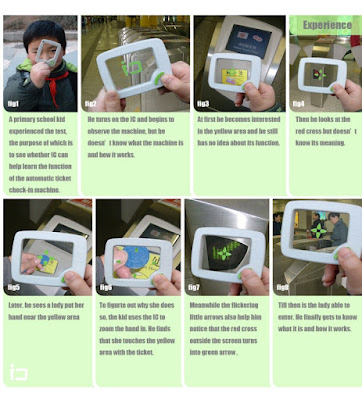
Tao Ma's IC inspired

Tao Ma's IC

The gadget is just a learning tool. But a similar device could be a glass to read between lines. You direct the device to a thing, the device requests the thing, it replies. And a "how-to" icon about the thing is displayed.

21 May 2009

Bracelet cell phone calls you gently

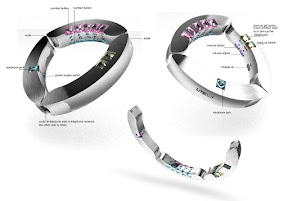
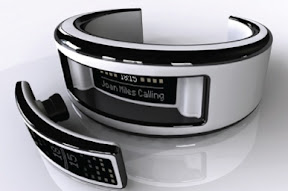
Bracelet cellphone - an inexhaustible theme for designer exercises. Just a short glimpse over the Web:

All these devices capture your attention to an incoming call in the same way - they vibrate. It is so easy to miss such a vibration in a day buzz. Even if the phone is in your pocket. And this noisy behavior of the elegant jewel is rude and irritating. The bracelet braces a wrist, what should it do on an incoming call?

It should squeeze your hand gently.

04 May 2009

Problem - type while walking

To use a notebook computer you have to seat down. Then you can type. The same difficulty is for sliding qwerty compacts such as OQO.

But often you are standing or even walking. And wanting to write a note, to schedule an appointment or to record a contact. And there are no time or appropriate place around to seat, to unpack a laptop and to open it. The only working solution is a touch screen PDA and a stylus. Left hand hold the device, right hand write with the stylus. But again, scribing is slow and screen keyboard is terrible to use. Well, there are things like the kangaroo laptop holder, but this is usable in rare situations only.

Any ideas?

01 May 2009

One-button mobile phone for children

Mobile communications for children. A worry point for parents - babies are to be in touch. A sweet piece for mobile operators and phone manufacturers - children are not fully captured by the business and can consume more traffic. So - the classic design exercise: mobile phone for children. It must be:

  1. Suitable for users (very young people): simple, pretty, light, tough and safe;
  2. Suitable for owners (very nervous parents): controlled, reliable and cheap.

The common root for all these properties is: being simple.

So - the small rounded rectangle with a single button: "Call". The idea of such a minimalistic one- or two-button communication Device is not new. Moreover it is actively exploited, especially as an emergency device - you press the button and the phone will connect you to the call-center. The proposed idea core is to adapt the Device class to the specific use.

  • Shape and size. There are two size limitations: length (for the antenna to work) and volume (for the battery to store energy). Device length can be 8 cm (wavelength quarter) or even smaller for 900 MHz GSM - quite compact. Battery feeds just a transmitter - there are no bright displays or powerful CPUs, so its capacity (and volume) could be small. I suppose a small rounded brick would be the best shape - it can be pleasant, easy to personalize (important for youngs) and simple to manufacture. The Device housing should be cast solid - no holes, sockets or detachable parts. Thus enough durability, water-, dust- and dirt-proofness will be achieved. So even the battery can have no packaging therefore saving weight and manufacturing cost. To avoid SIM-card manipulations the SIM chip have to be integrated into the Device. The speaker and the microphone should use a surface membrane, thus eliminating garbage collecting holes.

  • Controls. A button "Call the parent" - call a programmed number. The same button is used to hang up. Slightly advanced model can have several call buttons - for a specific number each. If the programmed number calls, the appropriate button will blink. For a rectangle case the best button shape is rectangle too. Ordered in a single column along the main axis of the Device face.

  • Power supply (charger). No sockets. A short-length wireless inductive power transmission should be used (a split electric transformer). Field shape design, relatively low frequency and device sensor make this approach safe enough. Also this EM link acts as a communication medium (see below). It should be a "base station" to drop the Device for charging.

  • Communication. Again - no sockets. The primary medium to control and program the Device is a contact-less base station. It is wired to the mains for power, optionally - to a computer. And - to a parent mobile phone via Bluetooth to program and control.

  • Programming. To assign a phone number to a button and to free a button. To accept or reject unidentified calls. The simplest way ("call me") is:
    A parent dials the device number -
    - The Device detects the calling number and rings, all free buttons blink -
    - Press a blinking button; the calling number will be assigned to the button.

    More complex approach is an (Java) application for a parent mobile phone. The application connects the Device base station via Bluetooth and later - the Device itself via an proprietary power link protocol (see Power supply). The application uses an unique security code (such as SIM PIN code) to access the Device.

    In the last case the Device is programmed by the mobile network operator remotely. A parent uses the operator web interface to request a programming task and the operator does the job via SMS or so.

  • Personalization. The Device has a simple and solid shape with flat sides. This makes it suitable to be decorated. The membrane "call" buttons could be signed by a pen and a thick soft transparent rectangle (provided with the Device) could be glued over to make a customized button.

  • Service. The device have to be locked to a mobile network operator. Sure the operator will offer dedicated group tariffs for parents and children with the Devices. The Device can guess its location using network cell data (to avoid an extra GPS receiver). And the Device should track is it with the child or not (using location tags or a simple electric capacitance measurement). Parents are informed about this by SMS or by an operator location service and a Java application for a parent's phone.

Safety. The device is deeply personalized. A stealth biometric authentication (such as one being developed by Apple) pushes the personalization even more. Also the Device is so cheap that there are no reason to steal it or even to robber. So it is safer for children. Simplicity and tough construction make the Device not breakable. So accidental injury risk is less.

Network operator side. Because there isn't a SIM-card, the Devices are sold with a pre-programmed phone number. Because of the users nature, the Devices will be lost frequently. Thus many phone numbers are wasted. But these numbers can be reused fast - only the parents know the actual Device phone number so no one will call the lost Device.

The Device should observe some of common earlier proposed location tags: classroom, gym, theater, etc. So there won't be loud rings in a class.

The Device could be good and simple for parents. I.e. for money payers. I.e. could be sold in tons even in drug-stores.

29 April 2009

Largest laptop problem - time to get it working

I bet that the most annoying misfeature of virtually every laptop is the start up time. Rolling out and connecting the power supply wires to a wall socket, waiting for OS to start requires about ... minutes. Even taking it from a bag takes some time. It hurts much operative style of mobile computing.

This is why PDAs are much superior to a conventional notebook PC in a mean of accessibility.

Let imagine a mobile computer that does not suffer from such a deficiency. First of all it have to be built from zero time start components. No HDD to spin up, but SSD. No back lit TFT display, but a passive display like e-paper. Low power consumption especially in sleeping mode. It permits to work on battery instead of mains power. And to use such a "hibernation" mode (instead of switching the computer off) and get it later on in a second.

For me the best existing creatures for this case are HTC Advantage and Shift models though I'm not a fun of their Microsoft internals.

25 April 2009

Location tags for mobile phone

For a long time mobile phones have "profiles" for different environment situations. These "profiles" include ring type and volume, screen brightness and similar tunings for comfortable use in the specific situation. But you have to switch profiles manually - that makes them being a feature of little use. So there should be a way for the phone to guess the environment. Or the environment should tell it.

The most obvious way is to install small beacons that transmit fixed messages such as "here is an office room". These beacons or "location tags" have to be cheap, reliable and working for a long time without any maintenance. The simplest method to transmit the tag message seems to be Bluetooth. The transmission power should be low to to limit the tagging zone size and to save energy. In this case any modern mobile phone can be used - just install the appropriate software. A phone receives a tag message about the location and acts according to the phone configuration for the location. It may obey the tag unconditionally or prompt the phone owner.

Several tag types proposed from the scratch:

Tag type Meaning Location Working distance Priority Shape Power source
"with me",
"street"
the phone is in a pocket or clipped to the belt worn low lowest belt clip,
key chain pendant,
button
electrodynamic (from walk shake),
electrothermal (from body warmth),
button cell
"bag" the phone is in the bag (especially useful for women) in/on the bag lowest higher than "with me" detachable pendant,
button,
sticker
electrodynamic (from walk shake),
solar cell (if the tag is located outside the bag),
button cell
"room" living room, office, classroom, theater, etc fixed on a wall or a furniture in the room large (use several tags to cover the whole compartment) high sticker,
pass-through plug to a wall socket
solar cell (uses the room illumination),
a wall electric socket (power mains, computer network, phone - the tag is transparent for the transmission, it just seal some energy)

Tag meaning can be programmed. So as the tag is just a tag, and the phone is told to recognize it in a specific way.

Tags can be sold by retail stores in sets of different tag types. These end-user tags have to be linked with the phone by the owner. For other phones they are meaningless. There are also possible commonly recognized tags: theatre/church, cafe, classroom, gym, etc. These tags could be silently scattered in appropriate sites by a vendor or an operator. Such a guerrilla marketing.

Really these tags could be useful for any wearable gadget that behaves location-specific.