Nobody wants to be in Operations. It doesn't give you all those technology toys so abundant these days. It also means a quite pronounced compensation gap to those having "developer" in their title. These tensions are the origin of a popular HR cliche - "DevOps engineer". But its popularity doesn't come just from the dissatisfaction of operations engineers. And, while it solves the HR pain, it doesn't do the same for the business problem.
The millennium brought a significant change in computing infrastructure for commercial applications. It used to be hand-made, sometimes even by means of physical tools. Now it is API-controlled. Like Ritchie called malloc() in 1970x to get some room for the application data, we call a (cloud) API to get memory and computational power, to interconnect parts of the application system. The cloud is not a bunch of virtual machines, it is a medium running application software systems. The cloud may be a public IaaS like AWS, or on-prem middleware like Kubernetes, or a serverless platform, but that are details. The cloud is the computer for application software. It is a big deal and it does affect professionals working with it.

Computing infrastructure becomes less separated from application code. Evolving from custom-built bare metal servers to application middleware to immutable VMs to serverless and cloud native architectures. The staff working with computing infrastructure is expected to have skills like regular software engineers have. Because software took over that used to be controlled by human management processes.
Deployment of an application system to a computing infrastructure used to be an operation activity. Requiring skills in operations and operational processes. Now deployment topology of an application system is a part of the application design, its implementation is a part of the application code, it is delivered like any other software. Deployment engineers have to have the traits of software developers. They need to know not just how to code, but also how to plan, deliver and ensure quality.
Meanwhile operations of software systems become routine. Much less craft or magic. Humanless or push-button operation became an implicit requirement from business stakeholders willing reduce risks and cost of ownership. Application operations dissolve in the product teams. Eventually operations cease to be a separate activity worth a dedicated department. At the other side, shorter release cycles, Continuous Delivery, DevOps transformation made operations an invaluable source of feedback for application developers, a major pillar for QA process. Former technicians are effectively doing now that is known as "exploratory testing". Toil elimination trend calls for automation. Scale and velocity of application systems make eyeballs inadequate for system behavior analysis. It brings software code doing operation, monitoring, remediation. Done right it becomes a discipline referred to as SRE.
Application development also has to adapt to this "cloud computer". Applications has to be coded for the cloud computing architecture and APIs. One cannot just throw a Linux ELF or a Java JAR binary at a cloud infrastructure. The cloud computer is efficient - if it is used efficiently. Lastly the cloud computer is enormous but not reliable, just due to its scale.
All that stretches responsibility of the existing professional groups (primarily Development and Operations) way beyond a comfortable level. Operations suffer more because the same people works within different (often mutually exclusive) processes.
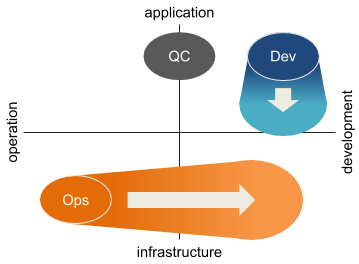
The old school professional profiles do not work well in the new landscape. They need a transformation. HR rebranding "Operations" to "DevOps" does not help much. Business and engineering problems need more, they need professionals skilled and trained for the new problem domain and processes matching these domains - application development and delivery with cloud computing. These professional roles may be
- Application developer. Expert in business logic and UX domains. They will learn holistic system view from Operations.
- Quality assurance engineer. Coming from testers (quality control) group, they need analysts skills and full stack familiarity with the application system.
- Reliability engineer (SRE). Expert in automation, operations and feedback. Adopt a lot from QA.
- Cloud developer (let's call them that way). Experts in infrastructure and system operation domains. They are to acquire decades of software delivery body of knowledge.
Advent of cloud computing has forced the change, but it also simplifies it. The "cloud computer" takes a lot of operation and infrastructure development burden. It lets professionals working for the application domain to focus on specific problems.

"Cloud developer" is a new title, but it has roots in the past. It is a system software engineer moved to the era of cloud computing. Same traits - strong knowledge of the underlying infrastructure and familiarity with system operations. Same challenges - long product lifetime, difficulty of changes and high expectations for quality. Though "cloud developer" is not the same as "system software engineer". A system software engineer implements a tiny interface to the underlying hardware in a way that is as application agnostic as possible. While a cloud developer makes a skeleton of an application system. As a skeleton it is not functional by itself but has the shape and major properties of the resulting living product or service. More than any other part of the application body it demands holistic understanding of the habitat, the scale and the behavior.
Obviously a cloud developer is a member of a development team. A team is a group of professionals working towards a common goal following shared processes. What is distinct for development teams:
- The work is planned. With all the agility, a development work has to be planned or it won't reach its goal.
- The work creates transferable artifacts. A product of the work is useful by itself, separated from its creators.
- Work artifacts have quality guarantees built in, provable and enforceable.
Quality is paramount for an application system skeleton because it is difficult to fix or change later. A skeleton needs to absorb without crushing the harm and wear by unplanned changes, shortcuts and defects over the system lifetime. While the quality almost newer improves over time. Luckily, software development industry created plenty of quality assurance tools - design methodologies, feedback cycles, high level languages, cross-validation, various forms of evaluation and testing to name a few.
But why an organization should invest in the change, grow this new professional group? Cloud technologies mature. Business takes them (mainly their promises of efficiency and velocity) for granted. DIY craft by "Jack of all trades but master of none" people rebranded from Operations ceases to match these expectations. Application development for the cloud is a big slice and it is not uniform. It requires complementary skill sets too broad to fit comfortably to a human head. It justifies another professional branch. And provide new opportunities for those sitting in development and operations silos, regardless if they are labeled with "DevOps" in the title or not.


